
Graphics settings
The four quality presets, what each option does, and which ones cost the most.
On this page
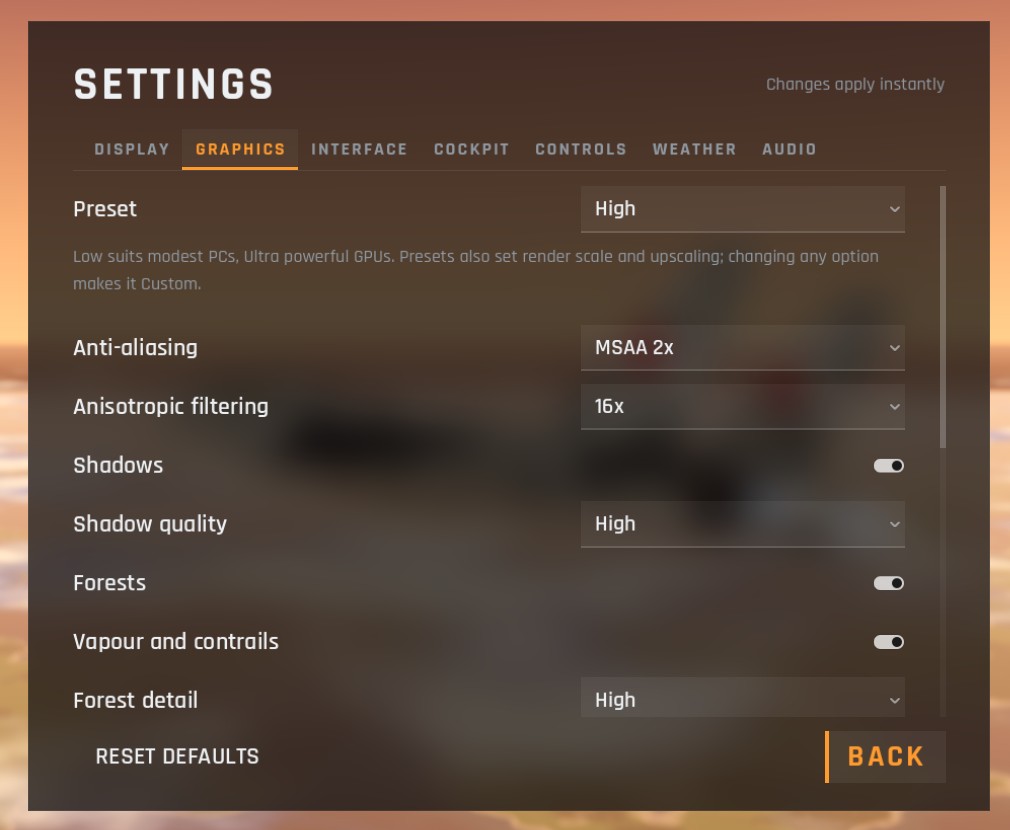
Low suits modest computers, Ultra powerful graphics cards. Pick a Preset first, then adjust single options if you like. Changing any option by hand turns the preset into Custom.
The presets
| Option | Low | Medium | High (default) | Ultra |
|---|---|---|---|---|
| Render scale and upscaler | 70%, FSR 1.0 | 85%, FSR 1.0 | 100% | 100% |
| Anti-aliasing | Off | MSAA 2x | MSAA 2x | MSAA 4x |
| Anisotropic filtering | 4x | 8x | 16x | 16x |
| Shadows | Off | Medium | High | Ultra |
| Ambient occlusion | Off | Off | On | On |
| Bloom | Off | On | On | On |
| Forests | Low detail, sparse | Medium, medium | High, full | Ultra, full (Ultra) |
| Draw distance | Near | Medium | Medium | Far |
| Volumetric clouds | On | On | On | On |
| Cloud quality | Low | Medium | High | Ultra |
| Terrain detail | Low | High | High | High |
| Cockpit screens | Low | Medium | High | High |
| Rear-view mirrors unfolded | No | No | Yes | Yes |
Presets also set the render scale and upscaler on the Display tab.
Every option
| Option | Choices | What it does |
|---|---|---|
| Anti-aliasing | Off, MSAA 2x, MSAA 4x | Smooths jagged edges on the jets, runway and cockpit |
| Anisotropic filtering | Off, 2x, 4x, 8x, 16x | Keeps textures sharp at shallow angles, such as runway markings ahead of you |
| Shadows | On, off | Shadows from the sun on the ground, trees, jets and in the cockpit |
| Shadow quality | Low, Medium, High, Ultra | How far shadows reach and how sharp they are |
| Forests | On, off | The trees on the map |
| Forest detail | Low, Medium, High, Ultra | How far out trees are drawn in full detail |
| Forest density | Sparse, Medium, Full, Full (Ultra) | How many trees there are |
| Vapour and contrails | On, off | Wingtip vortices, vapour over the wings when you pull hard, and contrails up high. Not changed by the presets |
| Ambient occlusion | On, off | Soft shading where surfaces meet |
| Bloom | On, off | The glow around bright lights, the sun and afterburner flames |
| Draw distance | Near, Medium, Far | How far detail is drawn |
| Volumetric clouds | On, off | Real 3D clouds you fly through, casting shadows. Off leaves a thin cloud layer in the sky, a big saving on weak graphics cards |
| Cloud quality | Low, Medium, High, Ultra | Detail and lighting inside the volumetric clouds |
| Terrain detail | Low, High | A lighter ground shader on Low |
| Cockpit screens | Low, Medium, High | The picture size of the cockpit's displays |
| Rear-view mirrors (unfolded) | On, off | Whether the mirrors start unfolded. Each mirror draws an extra view; fold them in flight with I |
What costs the most
If you need more speed, try these first:
- A lower render scale with FSR (Display tab).
- Shadows to Medium or off.
- Cloud quality lower, or Volumetric clouds off on a weak graphics card.
- Ambient occlusion off.
- Mirrors folded (I) and Cockpit screens lower.
- Forest detail and density lower.
The FPS counter in Interface settings shows the effect of each change.
Checked against FlightOut 0.5.1.