
Autopilot
Using the Su-27's autopilot: engaging it, the speed, heading, altitude and vertical speed modes, level recovery, the panel and the keys.
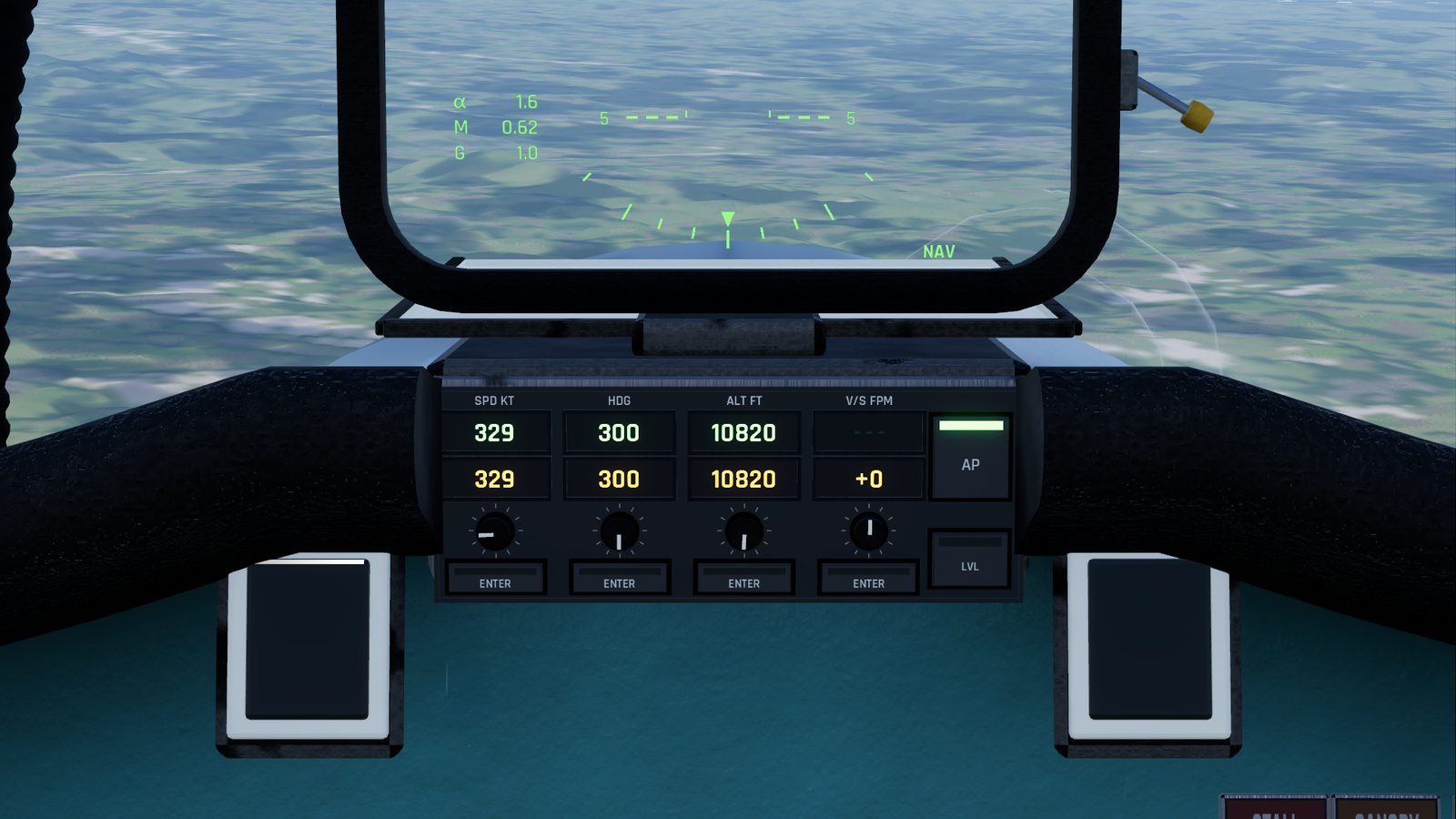
The autopilot holds your speed, heading and altitude, climbs or descends to a new altitude, and can bring the jet back to level flight from any attitude. Its panel sits under the HUD.
Switching it on and off
| Do this | How |
|---|---|
| Engage | AP button, or J. It holds the speed, heading and altitude you have now |
| Level the jet | LVL button, or Y |
| Disengage | AP again, or J |
| Engage and fly one value | That column's ENTER while the autopilot is off |
- It won't engage on the ground.
- If you're banked more than 10° or climbing or diving more than 5° when you engage, it levels the jet first, then holds wherever it ends up.
- It disengages by itself when the wheels touch the ground or the jet stalls deeply. The AP button blinks amber for 3 seconds and the HUD flashes AP OFF. After a stall the amber ACS FAIL lamp lights for 5 seconds too.
The panel
Four columns, left to right: SPD, HDG, ALT and V/S, in the units set in Interface settings. Each has:
| Part | What it does |
|---|---|
| Green window (top) | What the autopilot is flying now. Dashes when it isn't flying that value |
| Amber window | The value you have selected. While the autopilot is off it follows the jet |
| Knob | Changes the amber value: click its right half to increase, left half to decrease, or use the mouse wheel over it. Spin the wheel fast for bigger steps |
| ENTER | Flies the amber value. It blinks while the amber value differs from the green one |
Steps per click: speed 5 kt (10 km/h), heading 1°, altitude 100 ft (50 m), vertical speed 100 ft/min (1 m/s).
Typing a value: click an amber window and type the number. Enter sets it and flies it, Esc cancels, clicking elsewhere sets it without flying it.
The modes
| Mode | What it does |
|---|---|
| SPD | Holds the speed with the auto-throttle. It never uses the afterburner, and it can bring the throttle back to idle. Moving the throttle yourself cancels SPD, while the rest of the autopilot keeps flying |
| HDG | Turns to and holds the heading, banking up to 30°, the short way round. Always on while the autopilot is engaged |
| ALT | Climbs or descends to the altitude at up to about 3,000 ft/min (15 m/s), then holds it |
| V/S | Climbs or descends at the vertical speed you set until it reaches the ALT window, then levels off there. With no rate set, ENTER uses 1,000 ft/min towards the ALT window. If the rate points away from the ALT window, it keeps going |
| LVL | Recovery: rolls the wings level and stops any climb or descent, then holds that heading and altitude. Any stick input cancels it |
On the HUD, top left: AP and the heading and altitude it is flying (plus the vertical speed in V/S mode). The speed it holds is shown as A and a number under the speed box. A small mark on the heading tape shows the heading the autopilot is flying.
Flying with it engaged
Move the stick and you fly the jet: the autopilot gives way. Let go, and it holds the heading and altitude you left it at. This is the easy way to make a small correction without switching it off.
Keys
| Key | Does |
|---|---|
| J | Autopilot on or off |
| Y | LVL: level the jet |
| Page Up / Page Down | Selected altitude up or down |
| [ / ] | Selected heading left or right |
| = / - | Selected speed up or down |
Hold a key to repeat (10 steps a second after a short pause). V/S and the ENTER buttons have no keys: click them. All keys can be changed in Settings, Controls.
Good to know
- The autopilot doesn't fly approaches or landings: there is no coupling to the landing guidance. Fly the approach yourself, or use HDG and V/S to set it up.
- It keeps flying if you open the pause menu online.
- The speed window can be set far above the jet's 1,400 km/h limit. The auto-throttle never uses the afterburner, so it can't reach a very high speed in level flight, but watch it in a dive.
Checked against FlightOut 0.5.2.