
The HUD in NAV mode
Every symbol on the Su-27's head-up display in NAV mode, what it means and how to use it.
The HUD (head-up display) is the glass in front of you in the cockpit view. Its symbols are focused at infinity and drawn on the world, so they line up with what is outside whichever way you lean. It is only readable in the cockpit view: press V until you get there.
NAV (1) is the master mode for flying from place to place, taking off and landing. It is the mode you start in. The combat modes have their own pages, which come later in the docs.
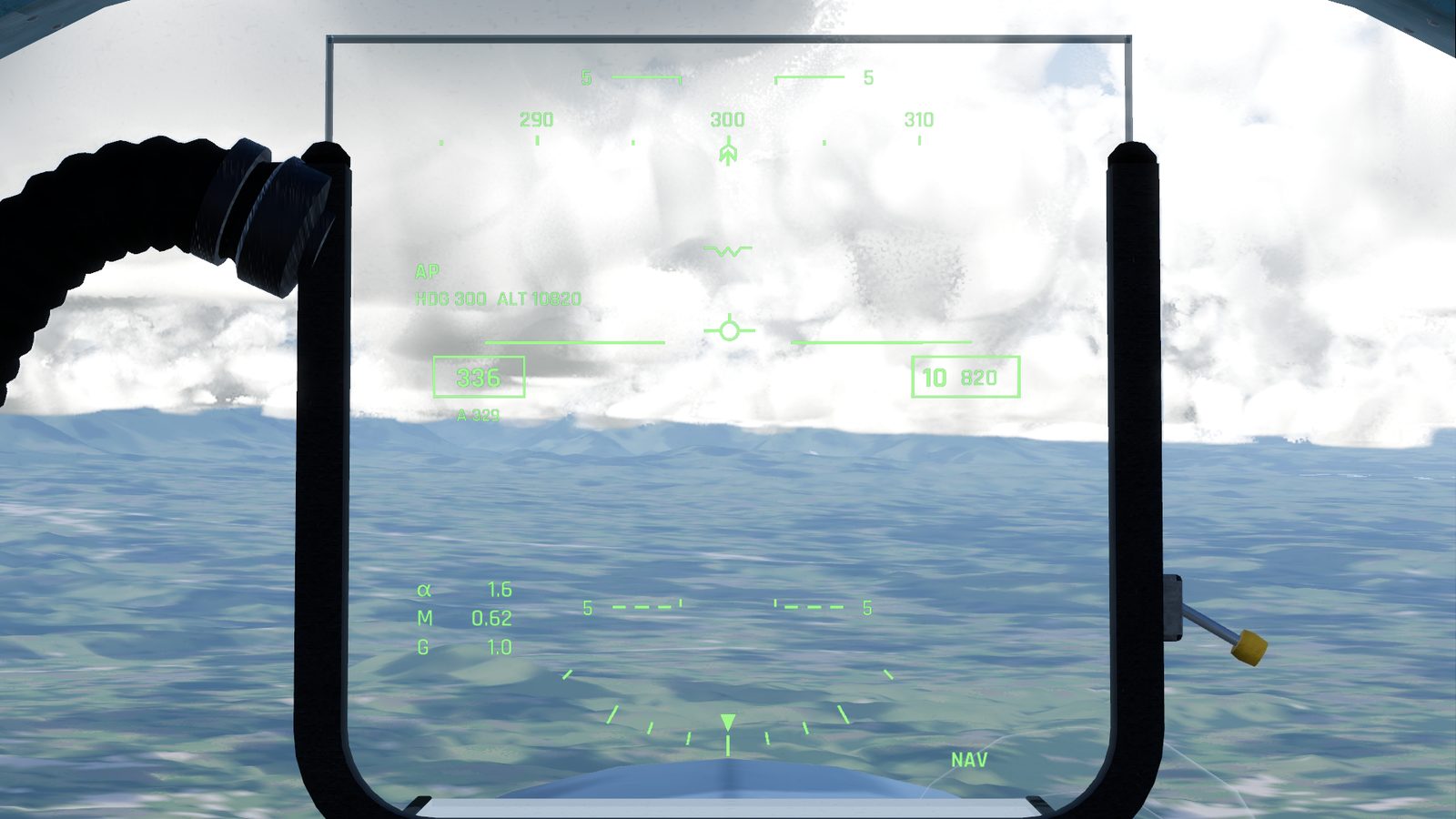
What's on it
| Symbol | Where | What it tells you |
|---|---|---|
| Heading tape | top centre | Where the nose points, in degrees from north. Numbers every 10°, ticks every 5° |
| Speed box | left of centre | Indicated airspeed, in knots or km/h. This is the speed the wings feel, so a headwind shows even when you are parked |
| Altitude box | right of centre | Height above sea level, in feet or metres. The thousands are in big digits |
| Radar altitude ("R") | above the altitude box | Height above the ground under you. Shown below 1,500 m (4,900 ft) |
| Pitch ladder | across the middle | Lines every 5° above (solid) and below (dashed) the horizon |
| Boresight "W" | fixed in the centre | Where the nose points |
| Flight path marker | moves | A small circle with wings: where the jet is actually going. Below the "W" by your angle of attack, to the side if you are drifting in a crosswind |
| α, M, G | lower left | Angle of attack in degrees, Mach number, and G |
| Bank scale | bottom | Ticks at 10, 20, 30 and 45° each side |
| GEAR | lower left | Shown while the gear lever is down |
| NAV | lower right | The master mode |
| Autopilot | upper left | "AP" and its targets while it flies; "AP OFF" flashing for 3 seconds when it lets go. See Autopilot |
| A and a number | under the speed box | The speed the auto-throttle is holding, while it is on |
| Warnings | centre | PULL UP, STALL, OVER G and SINK RATE flash here, the most urgent one at a time. See Warnings |
Units follow Settings, Interface, Units: knots, feet and nautical miles, or km/h, metres and kilometres. Heading, angle of attack, Mach and G don't change. The round gauges on the panel always read knots and feet.
Flying with the flight path marker
The flight path marker is the most useful symbol on the HUD:
- Put it where you want to go. Level flight: the marker on the horizon. On approach: the marker on the runway's aiming point.
- It shows wind drift. In a crosswind the marker sits to one side of the "W": the jet points one way and travels the other.
- Caging it: press X. The marker is held on the centre line and only shows climb or descent, which is easier to read in a strong crosswind. A faint second marker shows the real one while they are apart. Press X again to release it.
The landing guidance
With the gear down in NAV mode, lined up with a runway, the HUD adds a guidance cue, the runway's name and the distance. How to use it is on Approach and landing.
Checked against FlightOut 0.5.2.